Walk through the current Fusion chart.
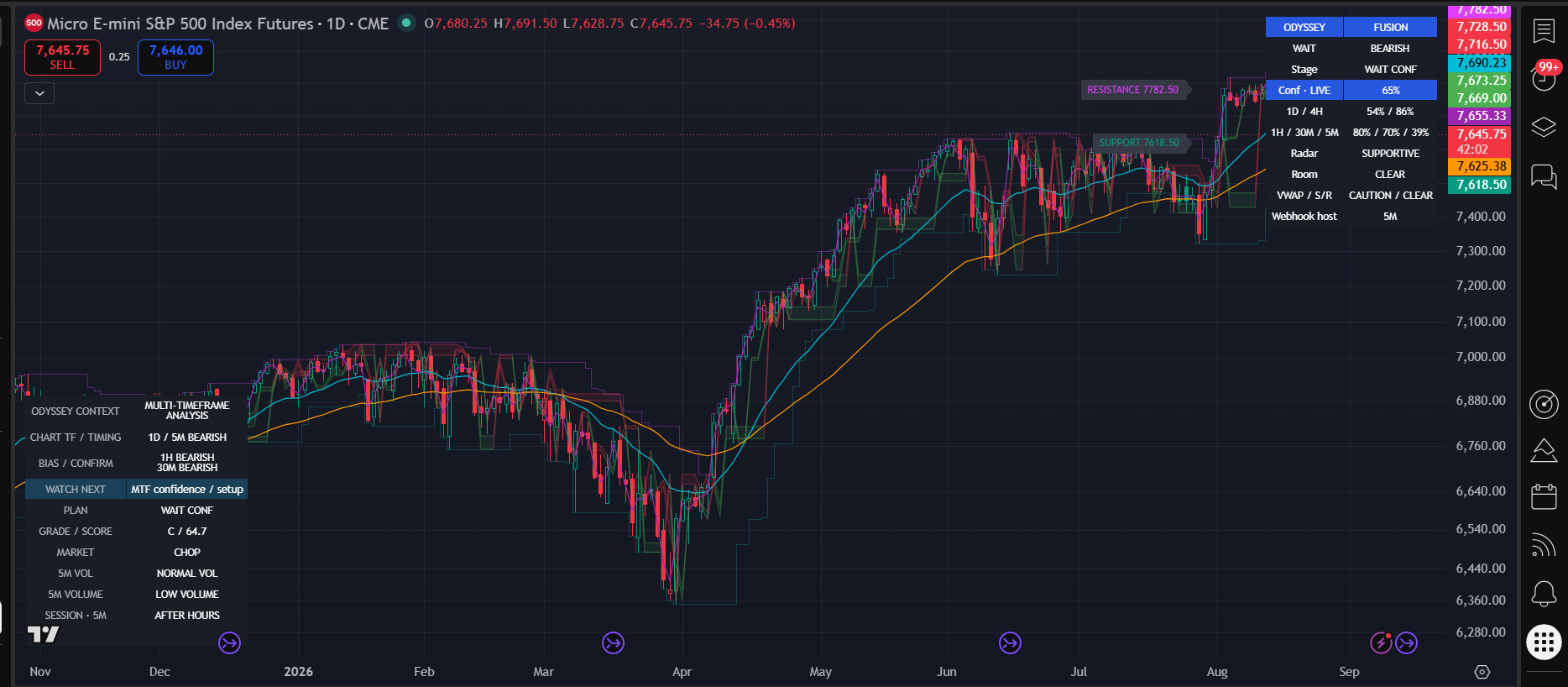
This captured MES1! daily view shows the current compact interface. It is a historical observation, not a trade recommendation or a reconstructed performance result.
1. Identify the view
The chart is MES1! on 1D, while the dashboard host remains 5M. CHART TF / TIMING distinguishes the current daily view from the underlying timing context. Do not treat the daily screenshot as evidence of a new daily entry rule.
2. Read direction and alignment
The dashboard shows WAIT and BEARISH with WAIT CONF, while Radar is SUPPORTIVE. The 1D / 4H and 1H / 30M / 5M rows let you compare broad context and nearer-term evidence. The coexistence of supportive Radar and bearish direction is a reason to inspect the whole picture.
3. Read the price map
Light green/red areas show rejection-zone context. Named SUPPORT and RESISTANCE labels give price references. Neither a supportive area nor clear room guarantees the next price move.
4. Follow WATCH NEXT
The context panel shows MTF confidence / setup, with CHOP market context. The useful next action is to observe developing alignment, not infer a confirmed trade from the screenshot.
5. Distinguish setup from trigger
This image does not establish a fresh BUY / SELL or an actual entry. When a setup develops, inspect its plan and the explicit trigger candle on the host chart. PB confirmation is a separate path from ordinary retest context.
6. Respect invalidation and changing risk
An invalidated or expired setup calls for a new setup. If price has already moved, the original entry reference no longer implies the same R:R; do not chase a historical marker. No subsequent outcome or fill is asserted here.
Your observation notes
Record symbol/feed, time, chart timeframe, each MTF reading, Radar, WATCH NEXT, market state and any actual trigger before looking ahead. Separate what was visible then from what you learn later.
- SETUP
- PULLBACK
- RETEST
- CONFIRMATION
- BUY / SELL
- MANAGEMENT
- TARGET / STOP
Possible sequence, not a required checklist: not every valid move includes every step. Standard BUY / SELL does not require the separate PB confirmation sequence. A developing setup may instead become INVALIDATED or EXPIRED.
Odyssey Fusion is a technical-analysis and decision-support indicator for educational and informational use, not financial advice. Signals do not guarantee profit. Users remain responsible for trade decisions, position sizing and risk. Model observations are not broker fills. Historical examples do not guarantee future results. Customer execution is manual; Odyssey does not place trades. Trading involves risk.